Lost & Fought › How to play
How to play Lost & Fought
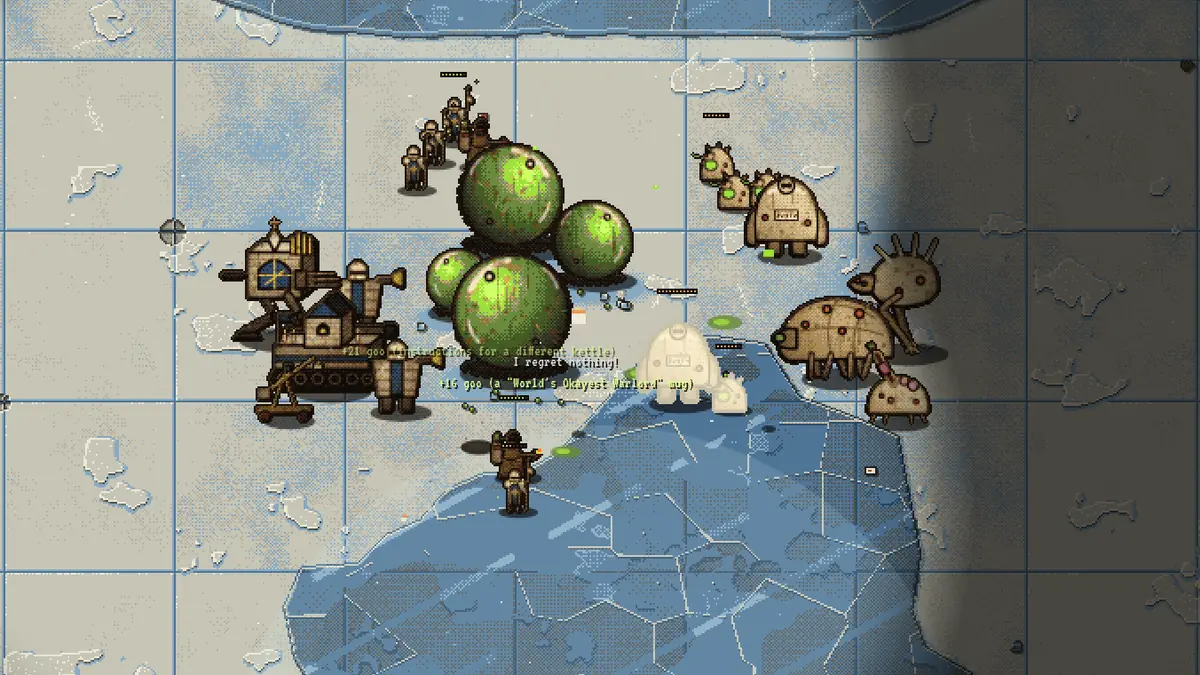
Lost & Fought is a real-time strategy game in your browser. You command an army from a headquarters, take goo wells for income and settle the claim before the clock runs out. This page is the briefing: rules, RTS controls, and what to do in your first seven minutes.
The goal: win the claim
Every match is a claim before the Small Claims Court of Combat of the Multiversal Bureau of Lost Property. There are two ways to win:
- Destroy every enemy HQ. The last headquarters standing wins on the spot.
- Hold the most goo wells when the claim period ends. A claim period lasts 7 minutes, 12 on the Lost Luggage Carousel. If the wells are tied, the court rules by headquarters damage. If that is tied too, the Bureau loses the paperwork and it is a draw.
On Lots with three or more claimants everyone fights everyone. There are no teams, only grudges.
Goo, wells and Lost Property
Goo wells
Everything runs on goo. You start with 300 and your HQ trickles in 4 goo per second. Each goo well you own adds 2.6 per second, so wells are the economy. To claim a well, move units into its ring and keep them there. Fast cappers (the Outrider, the Screamer, the Mop Runner) claim twice as fast as everyone else. Flyers cannot claim at all.
Some Lots have a super well in the middle, such as The Coffee Machine on the Bermuda Desk, that counts three times, both for income and for the final count.
Lost Property
Every destroyed unit leaves a wreck worth 35% of its cost in goo. Walk any unit over it to collect. Wrecks disappear after 45 seconds, so salvage while the fight is still warm. Each faction gets a different rate: the Custodians take +50%, the Knights +15%, the Gloop +5%.
Bureau deliveries
About 50 seconds into a match, and then every 45 to 75 seconds, the Bureau returns something from the sky: a grand piano, a vending machine, 47 garden gnomes, the kitchen sink. A shadow and a ring mark the spot and a BUREAU NOTICE warns everyone. Get out of the circle. The impact hurts every unit in range, friend or foe; headquarters take half.
Small items land as Lost Property to collect. Large ones stay on the field as a structure that light ranged infantry can garrison: select them and right-click the structure. A garrison holds three or four units, protects them and sees far. To leave, click the occupied structure and right-click where they should go.
Building an army
Your HQ trains every unit. Press the key or click the tile in the sidebar; the cost is deducted when the order is placed. Holding Shift while pressing the key cancels the last order of that type and refunds it.
- Q W E R T infantry: fast capper, line infantry, anti-swarm, heavy, artillery.
- X C V tank, two-legged assault mech and titan. Only one titan at a time.
- B flyer. Flyers ignore terrain, and only ranged units and HQs can hit them.
Select your HQ (H or click it), then right-click the ground to set a rally point: new units march there on their own. The full roster with costs is on the factions page.
The relic
Each faction has a relic that charges over 90 seconds. Press G, then pick the target. A ritual of about four seconds follows, and the enemy is warned while it runs, so aim where they cannot step out in time. Then it hits everything in a wide circle hard.
RTS controls and hotkeys
The controls follow the classic RTS layout: left-click selects, right-click orders. Press F1 or ? in a match for the same sheet in game.
Select and order
- Left-click
- select a unit · on empty ground: deselect
- Left-drag
- select every unit in the box
- Double-click
- select all units of that type on screen
- Right-click
- move, or attack what you clicked
- Shift + right-click
- queue waypoints (the path shows while selected)
- A
- attack-move: walk there, fight anything on the way
- S
- stop
- F
- select all your units
- .
- select idle units · press again to visit each
- Shift + 1–9
- form a battalion (Ctrl works too)
- 1–9
- select that battalion · press twice to jump there
Headquarters
- H
- select HQ, then right-click to set the rally point
- Space
- jump to your HQ
- Q W E R T
- train infantry
- X C V B
- tank · mech · titan · flyer
- Shift + key
- cancel that order
- G
- relic ritual (about 4 s, the enemy sees it coming)
View and court
- Right-drag
- pan the map (middle-drag too)
- Arrows / screen edge
- pan
- Shift + F2–F4
- save the current view · F2–F4 jumps back
- Mouse wheel
- zoom 1× / 2× / 3×
- L
- unit labels
- P
- pause (single player only)
- M / N
- music / sound effects
- Enter
- chat (online)
- Esc
- menu
Tips for your first claims
- Wells first. Send your fast cappers to the nearest wells in the first seconds. Every second a well sits empty is goo you never get back.
- Use battalions. Put the fighting army on 1, cappers on 2, artillery on 3. Pressing a number twice jumps the camera there.
- Queue paths with Shift. Shift + right-click lets a capper run a loop of several wells without you watching it.
- Press . often. Idle units are wasted goo. The key cycles through every unit standing around.
- Bookmark the hot spots. Shift + F2 on the middle well, Shift + F3 on your base: F2 and F3 then switch between them instantly.
- Artillery needs eyes. Trebuchets, Matrons and Mortars outrange their own sight and have a minimum range. Keep a line unit in front of them.
- Splash beats swarms, heavies beat heavies. Answer a crowd of cheap infantry with the E unit; answer tanks with the R heavy and the X tank.
- Watch the clock. In the last minute, count wells. Holding one more than the enemy is a win, even if their army is bigger.
Browser RTS multiplayer
Click MULTIPLAYER in the main menu to file a joint claim with other people. Everything runs in the browser; nobody needs to install anything or create an account.
- Open a claim room and send the invite link or the five-character room code. Rooms are private (invite only) by default.
- Public rooms appear for everyone under Open claims, with Lot, seats and factions. Click one to join.
- Quick join puts you into the fullest public room with a free seat, or opens a new public room on the Lost Luggage Carousel.
- Up to 9 players on the Lost Luggage Carousel, humans and computers mixed. The host can let the computer fill empty seats (easy, normal or hard). Several players may pick the same faction.
- Chat with Enter during the match. Online matches cannot be paused.
- Dropped out? Reload the tab and you get your seat back. After 60 seconds away the computer takes over your army until you return.
The game server is authoritative: your browser sends orders, the server runs the simulation and sends back what your side can see. Fog of war is enforced on the server, so nobody can peek.
Read more
- The three factions: every unit, HQ, relic and hero.
- The six Lots: sizes, hazards and how each one plays.
- About the game: why a 90s RTS, and how it is built.